
Manuals V-2.6.0
Overview
What is the keyon - Luna Monitor Service
The Luna Monitor Service is a Windows Service for the observation of Luna SA HSM Slots which are used in the High-Availability mode.
The Luna Monitor Service observes each member of a HA group and logs its status to the Windows Application Event Log.
In addition to the observation of the network availability of the HSM Slots, the Luna Monitor Service also checks the private key access of a certificate. A signature test is performed using the Luna SA Crypto-Service Provider or the SafeNet Key Storage Provider for a specified key on an HSM slot and the result is logged to the Windows Application Event Log.
General Design
The Luna Monitor Service is running as a Windows Service and does periodically execute the Luna Monitor Processes. All log entries are written to the Windows Application Event Log.
Release Notes 2.6.0
Support for Overall state logging
Overall state logs periodically whether the state is good or has errors. Overall state is configurable to only log after repeated runs of failures.
If consecutive runs result in error, the OverallState are initially logged as Warning.
When the configured threshold of consecutive runs still results in error, this time the OverallState is logged as error instead warning.
Every time the configured repeate of consecutive run still results in error, this time the OverallState is logged as error instead warning.
New ServiceConfig elements: OverallStateSkipErrorThreshold, OverallStateRepeatErrorThreshold
Configurable Event Log IDs
New ServiceConfig elements: EventIdHAGroupSuccess, EventIdHAGroupWarn, EventIdHAGroupError, EventIdKeyCheckSuccess, EventIdKeyCheckError, EventIdOverallState, EventIdService
Release Notes 2.5.1
Search for certificates in user store
Also search the certificates for the signature check in the user store of the service account when they are not found in the computer store.
Release Notes 2.5.0
Support of Luna UC 10.1
The Luna Universal Client version 10.1 is now supported.
Replaced library for Signature test
The old library System.Security is replaced by the .NET-Framework library System.Security.Cryptography.
.NET Framework 4.6.2
The :NET framework 4.6.2 is required to run the application.
Release Notes 2.4.0
Support of Elliptic Curve Cryptography
The signature test now supports keys based on Elliptic Curve Cryptography.
Release Notes 2.3.0
Luna SA 7 support
The PKCS#11 cryptoki Library of the Luna SA 7 client is now supported. Older version as Luna SA 4 or Luna SA 5 are still supported in legacy mode.
New licensing CA added
New Keyon licensing CA was added. Usage of newer licenses for the software is now possible.
Release Notes 2.2.0
Luna SA 6 support
The PKCS#11 cryptoki Library of the Luna SA 6 client is now supported. Older version as Luna SA 4 or Luna SA 5 are still supported in legacy mode.
Release Notes 2.1.0
SHA-2 support
SHA-2 is used as Hash algorithm for the signature check of CNG keys. SHA-1 is used as Hash algorithm for the signature check of legacy CSP keys.
Installation
Prerequisites
Operating System
One of the following operating system is installed:
- Microsoft Windows Server 2016
- Microsoft Windows Server 2019
- Microsoft Windows Server 2022
.NET Framework
The following Software is installed on the server:
- Microsoft .Net Framework 4.6.2 or higher)
Installation Luna Monitor Service
Execute Installer Package
The keyon / Luna Monitor Service is shipped as a Windows Installer (MSI) package. Simply double click the installation file provided.
The installation is then started and shows mainly the following four screens:
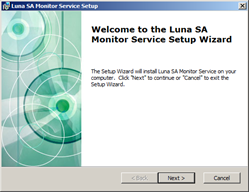
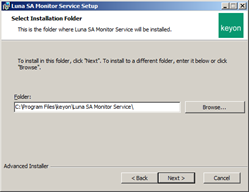
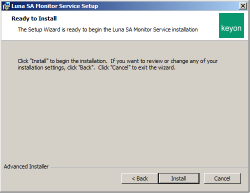
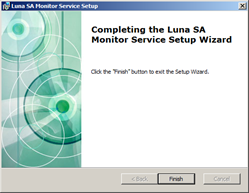
You can use Add or Remove Programs in the Windows control panel to repair or remove the keyon / Certificate Luna Monitor Service installation.
Silent Installation
Use below command as sample for a silent installation:
msiexec /i "C:\Install\LunaSAMonitorService-2.6.0\LunaSAMonitorService-2.6.0.msi" APPDIR="C:\Program Files\keyon\Luna Monitor Service\" /quiet
XML Configuration
License file
Copy the license file to the installation location of the Luna Monitor Service.
Luna SA PKCS#11 Libary
Create a copy of the Luna SA PKCS#11 Library (in most cases C:\Program Files\SafeNet\LunaClient\cryptoki.dll) and name it keyon_lunasa_monitor.dll. This copied PKCS#11 library must be referenced in the configuration as described in chapter Service Configuration |
Windows Service Configuration
- Open the Windows Services View of the server (start Administrative Tools > Services) and select the Luna Monitor Service. Check that the Luna Monitor Service runs under NT Authority/System resp. the local system account.
- Start the Luna Monitor Service in the Windows Service View.
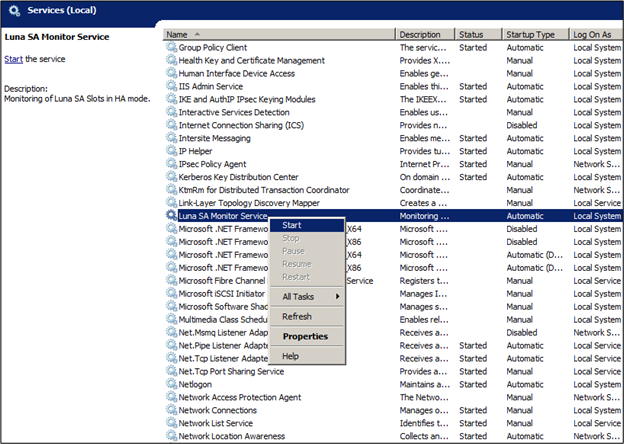
- Open the Event Viewer (start Administrative Tools > Event Viewer) and check the Windows Application Log for Information Warning / Error Logs of the Luna Monitor Service.
Configuration
The entire configuration of the Luna Monitor Service is configured in an XML configuration file.
XML Configuration Settings
The following settings must be configured for the Luna Monitor Service:
- Service Configuration
- Monitor Configuration List
- Service Event Log Configuration
Service Configuration
| Setting | Description |
|---|---|
| Pkcs11 Library Path | Defines the path to the SafeNet Luna SA Cryptoki library. Example: <Pkcs11LibraryPath>C:\Program Files\LunaSA\keyon\_lunasa\_monitor.dll </Pkcs11LibraryPath> |
| Pkcs11 Library Legacy Mode | Defines whether the referenced Luna SA Cryptoki library is version 4 or 5 (Legacy mode) or version 6. Example: <Pkcs11LibraryLegacyMode>true</Pkcs11LibraryLegacyMode> |
| Scheduler Cron Pattern | Defines the execution time interval of the monitor process. See chapter Scheduler Cron Pattern Configuration for a detailed description of the scheduler cron pattern. Example: Service starts the process execution all 30 minutes. <SchedulerCronPattern>0 0 0/1 \* \* ?</SchedulerCronPattern> |
| License File Path | Defines the path to the license file. Example: <LicenseFilePath>C:\Program Files\keyon\Luna Monitor Service\config\license.pem </LicenseFilePath> |
| OverallStateSkipErrorThreshold | Optional OverallState is only logged if this is set OverallState is logged as Error (instead of Warning), when any check results with error since x consecutive runs. If consecutive runs result in error, the OverallState are initially logged as Warning. When the configured value of consecutive runs still results in error, this time the OverallState is logged as error instead warning. OverallState is only logged if OverallStateSkipErrorThreshold is configured. |
| OverallStateRepeatErrorThreshold | Optional OverallState is logged as Error (instead of Warning), when any check results with error since x consecutive runs (once the threshold has been reached). If consecutive runs result in error, the OverallState are initially logged as Warning. Every time the configured value of consecutive run still results in error, this time the OverallState is logged as error instead warning. |
| EventIdHAGroupSuccess | Optional Overrides the Event Log ID that is logged when a HA group is checked with success Default if not set: 10 |
| EventIdHAGroupWarn | Optional Overrides the Event Log ID that is logged when a HA group is checked with warning Default if not set: 101 |
| EventIdHAGroupError | Optional Overrides the Event Log ID that is logged when a HA group is checked with error Default if not set: 201 |
| EventIdKeyCheckSuccess | Optional Overrides the Event Log ID that is logged when a key is checked with success Default if not set: 11 |
| EventIdKeyCheckError | Optional Overrides the Event Log ID that is logged when a key is checked with error Default if not set: 202 |
| EventIdOverallState | Optional Overrides the Event Log ID that is logged once at every execution to log the overall state (can be Info, Warn, Error) Default if not set: 400 |
| EventIdService | Optional Overrides the Event Log ID that is logged when the service is started Default if not set: 1 |
Monitor Configuration List
The Monitor Configuration List must contain at least one monitor configuration.
Monitor Config
| Setting | Description |
| HA Group Identifier | The identifier of the HA group. This can be the label or the serial number of the HA group. Example: The label of the HA group is “HATestGroup” <HAGroupIdentifier>HATestGroup</HAGroupIdentifier> |
| Warning Treshold | The threshold for members of HA group with failed state from which the log level warning is used. Example: <WarningTreshold>1</WarningTreshold> |
| Error Treshold | The threshold for members of HA group with failed state from which the log level error is used. Example: <ErrorTreshold>2</ErrorTreshold> |
| Key Identifier List | The list of key identifier elements as described in next section. |
Key Identifier List
| Setting | Description |
| Key Identifier | The serial number of the certificate in local computer store to perform a signature test. Example: The serial number of the certificate in local computer store is 716ff2001f83ef894bdae984088a56fc <KeyIdentifier>716ff2001f83ef894bdae984088a56fc</KeyIdentifier> |
Service Event Log Configuration
| Setting | Description |
| EventLogSourceName | Defines the Event Log source name Example: The Event Log source name is “Luna Monitor Service” <EventLogSourceName>Luna Monitor Service</EventLogSourceName> |
| EventLogDestinationName | Defines the Event Log destination name Example: The Event Log destination name is Application <EventLogDestinationName>Application</EventLogDestinationName> |
XML Configuration Examples
Standard Configuration
    <ServiceConfig>
        <Pkcs11LibraryPath>C:\Program Files\LunaSA\keyon\_lunasa\_monitor.dll </Pkcs11LibraryPath>
        <Pkcs11LibraryLegacyMode>true </Pkcs11LibraryLegacyMode>
        <SchedulerCronPattern>0 0 0/1 \* \* ?</SchedulerCronPattern>
        <LicenseFilePath>C:\Program Files\keyon\Luna Monitor Service\config\LunaMonitor.lic</LicenseFilePath>
    </ServiceConfig>
    <MonitorConfigurationList>
        <MonitorConfig>
            <HAGroupIdentifier>HaTestGroup</HAGroupIdentifier>
            <WarningTreshold>1</WarningTreshold>
            <ErrorTreshold>1</ErrorTreshold>
            <KeyIdentifierList>
                <KeyIdentifier>12ecd0aec368b1bd4ec9a5b5023222af</KeyIdentifier>
            </KeyIdentifierList>
        </MonitorConfig>
    </MonitorConfigurationList>
        <ServiceEventLogConfig>
        <EventLogSourceName>Luna SA Monitoring Service</EventLogSourceName>
        <EventLogDestinationName>Application</EventLogDestinationName>
    </ServiceEventLogConfig>
</LunaSAMonitorServiceConfiguration>
Enhanced Configuration
With OverallState and modified Event IDs
<LunaSAMonitorServiceConfiguration>
    <ServiceConfig>
        <Pkcs11LibraryPath>C:\Program Files\SafeNet\LunaClient\cryptokimonitor.dll</Pkcs11LibraryPath>
        <Pkcs11LibraryLegacyMode>false</Pkcs11LibraryLegacyMode>
        <SchedulerCronPattern>0/15 \* \* \* \* ?</SchedulerCronPattern>
        <LicenseFilePath>C:\Program Files\keyon\Luna Monitor Service\config\LunaMonitor.lic</LicenseFilePath>
        <OverallStateSkipErrorThreshold>2</OverallStateSkipErrorThreshold>
        <OverallStateRepeatErrorThreshold>6</OverallStateRepeatErrorThreshold>
        <EventIdService>5</EventIdService>
        <EventIdHAGroupSuccess>1010</EventIdHAGroupSuccess>
        <EventIdHAGroupWarn>1101</EventIdHAGroupWarn>
        <EventIdHAGroupError>1201</EventIdHAGroupError>
        <EventIdKeyCheckSuccess>1011</EventIdKeyCheckSuccess>
        <EventIdKeyCheckError>1202</EventIdKeyCheckError>
        <EventIdOverallState>201</EventIdOverallState>
    </ServiceConfig>
    <MonitorConfigurationList>
        <MonitorConfig>
            <HAGroupIdentifier>HA\_LAB-IssuingCA</HAGroupIdentifier>
            <WarningTreshold>1</WarningTreshold>
            <ErrorTreshold>1</ErrorTreshold>
            <KeyIdentifierList>
                <KeyIdentifier>Demo Issuing CA</KeyIdentifier>
            </KeyIdentifierList>
        </MonitorConfig>
    </MonitorConfigurationList>
    <ServiceEventLogConfig>
        <EventLogSourceName>Luna SA Monitoring Service</EventLogSourceName>
        <EventLogDestinationName>Application</EventLogDestinationName>
        <EventLogDebug>false</EventLogDebug>
    </ServiceEventLogConfig>
</LunaSAMonitorServiceConfiguration>
Scheduler Cron Pattern Configuration
The Luna Monitor Service is using the Quartz Library to schedule the monitor process. The cron pattern is based on the well-known Unix Tool. Scheduling capabilities of cron are powerful and proven. Detailed information about the cron pattern ans its configuration scope can be found here:
https://www.quartz-scheduler.org/documentation/quartz-2.5.x/examples/Example3.html
Format
A cron expression is a string comprised of 6 or 7 fields separated by white space. Fields can contain any of the allowed values, along with various combinations of the allowed special characters for that field. The fields are as follows:
| Field name | Mandatory | Allowed Values | Allowed Special Characters |
|---|---|---|---|
| Seconds | YES | 0-59 | , - * / |
| Minutes | YES | 0-59 | , - * / |
| Hours | YES | 0-23 | , - * / |
| Day of month | YES | 1-31 | , - * ? / L W |
| Month | YES | 1-12 or JAN-DEC | , - * / |
| Day of week | YES | 1-7 or SUN-SAT | , - * ? / L # |
| Year | NO | empty, 1970-2099 | , - * / |
Examples
| Field name | Mandatory |
|---|---|
| 0 0 12 * * ? | Fire at 12pm (noon) every day |
| 0 15 10 ? * * | Fire at 10:15am every day |
| 0 0/5 * * * ? | Fire every 5 minutes. |
| 0 0 0/1 * * ? | Fire every hour. |
Logging
The Luna Monitor Service logs all actions to the Windows Application Event Log.
Log Entries
The event log source name and the event log destination name as well as the event IDs can be configured via the XML Configuration (see chapter Service Configuration. The following table describes the default Event Log IDs, used by the Luna Monitor Service.
| Event Log ID | Log Level | Description |
|---|---|---|
| 1 | Info | Luna SA Monitor processor is scheduled for next execution at . |
| 10 | Info | The status for token with identifier is: Member with serial 951389011 has status: OK Member with serial 951389001 has status: OK Elapsed time for monitoring token with identifier is . |
| 11 | Info | Successfully checked private key access for identifier with subject name . Elapsed time for private key access check for identifier is . |
| 101 | Warning | The status for token with identifier is: Member with serial 951389011 has status: OK Member with serial 951389001 has status: TOKEN_NOT_PRESENT Elapsed time for monitoring token with identifier is . |
| 201 | Error | The status for token with identifier is: Member with serial 951389011 has status: TOKEN_NOT_PRESENT Member with serial 951389001 has status: TOKEN_NOT_PRESENT Elapsed time for monitoring token with identifier is . |
| 202 | Error | Failed to check private key access for identifier . Elapsed time for private key access check for identifier is . |
| 400 | Info/Warning/Error | Overall state is logged once per execution, either as Info or Warning or Error. When the configured threshold of consecutive runs still results in error, this time the OverallState is logged as error instead warning. Every time the configured repeate of consecutive run still results in error, this time the OverallState is logged as error instead warning. |
The service itself is logged with source LunaSAMonitorService with Event ID 0 which is either Info or Error (e.g. with invalid XML configuration).
Monitoring the service
It is recommended to monitor the Windows Application Event Log entries as described in chapter Log Entries
Most monitoring solutions support the tracking of windows event log entries.
If no monitoring solution is in place, the Windows Task Scheduler can be used to track windows event log entries and execute different actions, for example sending emails.