
Manuals V-2.6.0
Overview
What is the keyon - Certificate Autorevocation Service
The Certificate Autorevocation Service is the complement of the Microsoft Certificate Autoenrollment Service. The Certificate Autoenrollment Service of Microsoft enrolls automatically certificates to objects in the Active Directory. Nevertheless, if the objects are removed from the Active Directory, the certificate will stay valid until they expire. The keyon / Certificate Autorevocation Service revokes periodically all these certificates, which have no corresponding Objects in the Active Directory anymore. The Certificate Autorevocation Service verifies which certificates have no associated AD Object and revokes them.
In addition the Certificate Autorevocation Service can be configured to revoke duplicate certificates.
General Design
The Certificate Autorevocation Services does periodically execute the Certificate Autorevocation Processes. The Certificate Autorevocation Process retrieves all certificates of a specific certificate type from a defined CA, which are not revoked and not expired.
One Process checks for every certificate if the corresponding AD Object is still available or activated in the MS Active Directory. Whether the object of the certificate is not available in the Active Directory, the corresponding certificate will be revoked by the CA.
The other process checks the certificate database of the ADCS CA for existing duplicates.
Both processes can be configured several times in the XML Configuration of the Certificate Autorevocation Service. The time interval of executing the Certificate Autorevocation Process can also be configured.
Release Notes
Version 2.6.0
Improvements
- Optimized handling and logging of AD attribute lookup
- Maintenance release
Version 2.5.0
New Features
Option to store Cert Revocation Details in a file locally instead sending in Max Revocation Size Limit exceeded notification (to prevent large mails)
When the Revocation Size Limit is exceeded, a notification mail is sent to a configured E-Mail address. To prevent to large mails, there is a new configuration value (4.1.4 Include in Mail Limit) which allows to set a limit of certificates to be listed in the notification. If this limit is exceeded (e.g. there are over 1000 certificates to be revoked), the certificate revocation details will be stored in a file on the server, and the notification simply contains a reference to this file.
Improvements
- Additional logging after sending email
- harmonized logging event source
Version 2.4.0
Memory Leak Fix
A memory leak caused by not released resources when querying the Active Directory has been fixed. Additionally the memory usage during the idle periods has been reduced.
Performance Improvement
The certificate search queries to the CAs has been improved (it no longer uses sorting on the CA, which makes the query really slow). Certificate caching has been introduced to prevent executing the same query multiple times each time the job is run.
Logging Improvement
Some confusing logging messages have been improved. Namely, “Revoked certificates…” is no longer logged when not in productive mode.
Detailed Process Sequence
AD Objects
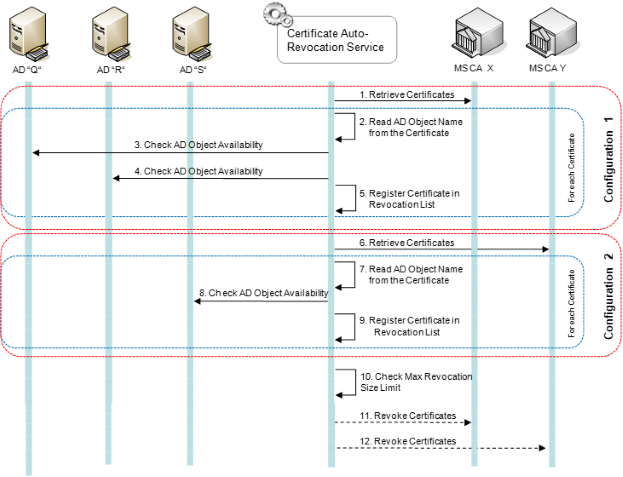
The search method depends on a configurable AD search filter. Currently, two filters can be set whereas for each filter different checks are done. If all checks fail, the auto revocation service assumes that an object is not available in AD.
| Filter | AD Object Search Criteria |
|---|---|
| Machine | 1. Certificate CN is compared with LDAP user constant “cn” 2. Certificate CN is compared with LDAP user constant “dNSHostName” 3. Certificate UPN retrieved from CA database - is compared with LDAP user constant “userPrincipalName” |
| User | 1. Certificate CN is compared with LDAP user constant “cn” 2. Certificate CN is compared with LDAP user constant “sAMAccountName” 3. Certificate UPN retrieved from CA database - is compared with LDAP user constant “userPrincipalName” |
Duplicate certificates
| 1) | Retrieve Certificates All certificates of a specific certificate template from the MS CA X, which are not revoked and not expired, are retrieved. |
|---|---|
| 2) | Check the Name from the Certificate The CN or the complete DN name of the corresponding certificate is checked for duplicates. |
| 3) | Save Certificate in Revocation List If a newer certificate with the same CN or DN exists, the certificate is added to the revocation list. |
| 4) | Revoke Certificates All the certificates which are registered in the revocation list of the service are revoked by the specified MS CA X. |
Revocation Size Limit
To prevent the Certificate Autorevocation Service from revoking an unlimited size of certificates, a maximum revocation size limitation must be configured in the XML configuration file.
When the service has a revocation list which exceeds the maximum size limitation value the following action will occur:
- An Email is sent to the CA Administrator with the list of certificates to revoke
- A Warning Log entry is written to the Microsoft Event Log with the list of certificates to revoke
Options if Revocation Size Limit is Reached
The CA Administrator has two options:
- If the listed certificates should be revoked, the CA Administrator agrees with the current revocation list and lets the auto revocation service process the revocations according to section 1.5.2.
- If the listed certificates should NOT be revoked, the CA Administrator can reset the current revocation list and fix the problem with the certificates and their corresponding AD objects.
Ignore Revocation Size Limit Once
The revocation size limit can be ignored once (for one execution of the auto revocation process) by setting a flag via the service client GUI. This “ignore once” flag is reset after the execution of the auto revocation process.
The execution of the auto revocation process can be forced by restarting the Autorevocation Service.
Permission of Service Account
The Auto Revocation Service is executed by a technical Active Directory account. This technical account must have the following permissions.
| Object | Permission | Description |
|---|---|---|
| Active Directory | Read Objects | Only AD accounts do have the permission to read AD objects. |
| Issuing CA | Issue and Manage Certificates | The Revocation service requires this permission to manage certificates on the issuing CA. |
| RA server | Read and Write File permission on the Certificate Autorevocation Service Installation Folder | The account requires these permissions to change a resource file. |
Error Handling
If an Error occurs during the Certificate Autorevocation Process, the running process is interrupted and the error cause is logged in the Windows Application Event Log. The service automatically attempts to execute the Certificate Autorevocation Process again at the next repetition interval (configured in the XML configuration).
The service can be forced to start the Certificate Autorevocation Process manually.
Information Email
The Certificate Autorevocation Service sends an information Email to the responsible people, when the revocation list exceeds the revocation size limit.
Email Template
The Email which is sent can be defined in a template text file. The template file gets reference in the XML Configuration file, see section 2.2.2.
The first line of the email template text file will be used as the subject header of the email.
Email Replacement Variables
The Email that is sent to the responsible people can contain the following replacement variables that are replaced by data.
Replacement Variable $CertificatesToBeRevoked
Data The variable will be replaced by data about the certificates that shall be revoked. The data is a list with data about each certificate. Each list element consists of the following comma separated data parameters:
- CertificateTemplate (Machine / User)
- SubjectCN (Subject Common Name of the certificate)
- UserPrincipalName (User Principal Name)
- SerialNumber (Certificate serial number)
Example list with 3 list elements:
- CertificateTemplate: Machine, SubjectCN: cl-04.subdomain.Testlabpki.test, UserPrincipalName: Testlab-cl-04.subdomain.Testlabpki.test, SerialNumber: 147b71e6000000000013
- CertificateTemplate: Machine, SubjectCN: cl-04.subdomain.Testlabpki.test, UserPrincipalName: Testlab-cl-04.subdomain.Testlabpki.test, SerialNumber: 147b99d1000000000014
- CertificateTemplate: Machine, SubjectCN: cl-04.subdomain.Testlabpki.test, UserPrincipalName: Testlab-cl-04.subdomain.Testlabpki.test, SerialNumber: 147bc6fb000000000015
Installation
Prerequisites
Operating System
One of the following operating system is installed:
Windows Server 2012 R2
Windows Server 2016
Windows Server 2019
.Net Framework
The following Software is installed on the server:
- Microsoft .Net Framework 4.7.2
Certificate Autorevocation Service Account
A technical user account has been configured for the Certificate Autorevocation-Service. This user account has the appropriate permissions according to section 1.6 of this document.
Installation of Certificate Autorevocation Service
Execute Installer Package
The keyon / Certificate Autorevocation Service is shipped as a Windows Installer (MSI) package. Simply double click the installation file provided.
The installation is then started and shows mainly the following four screens:
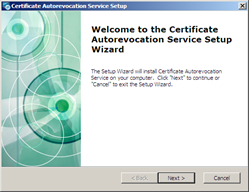
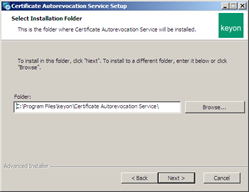
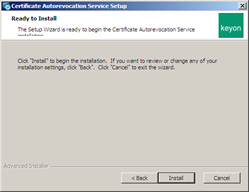
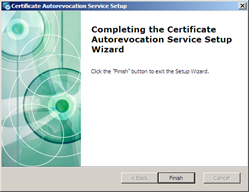
You can use Add or Remove Programs in the Windows control panel to repair or remove the keyon / Certificate Autorevocation Service installation.
XML Configuration
Open the ConfigurationXmlFile.xml file and configure the XML Configuration settings of the Certificate Autorevocation Service according to chapter Configuration in this document.
License file
Copy the license file to the installation location of the Certificate Autorevocation Service.
Windows Service Configuration
- Open the Windows Services View of the server (start 🡪 Administrative Tools 🡪 Services) and select the Certificate Autorevocation Service.
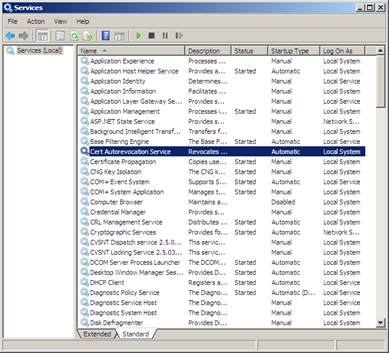
- Initial startup: To create the Windows Event Source for the Certificate Autorevocation Service , initially start the service with the Local System account first and then stop it again. After that, the service account can be configured as follows: Select the properties of the Certificate Autorevocation Service and navigate to the “Log on” tab of the CRL Management Service properties dialog.
- Set the preconfigured Active Directory user account for the Certificate Autorevocation Service and apply (OK).
- Start the Certificate Autorevocation Service in the Windows Service View.
- Open the Event Viewer (start 🡪 Administrative Tools 🡪 Event Viewer) and check the Windows Application Log for Information / Warning / Error Logs of the Certificate Autorevocation Service.
Update
Steps:
- Stop the service
- Run the update
- Restart the service
- Check the log (in Event Viewer) for successful startup
Notes:
- The specified logon user (Certificate Autorevocation Service Account) on the Windows service should remain the same.
- The main configuration files in “Certificate Autorevocation Service\config” will not be modified during update (only the *_new files will be updated).
- The configuration file CertAutoRevocationService.exe.config in directory “Certificate Autorevocation Service\bin” (holding additional logging parameters) will be replaced during update.
Configuration
The entire configuration of the Certificate Autorevocation Service is defined in an XML file with default path at:
C:\Program Files\keyon\Certificate Autorevocation Service\config\ConfigurationXmlFile.xml
XML Configuration Settings
License File Path
| Setting | Description |
|---|---|
| License File Path | Defines the path to the license file. Example: <LicenseFilePath>C:\Licenses\demo\_license.pem </LicenseFilePath> |
Scheduler Cron Pattern
| Setting | Description |
|---|---|
| Scheduler Cron Pattern | Defines the execution time interval of the revocation process. See chapter Scheduler Cron Pattern Configuration for a detailed description of the scheduler cron pattern. Example Service starts the process execution every day at 21:00: <add key="SchedulerCronPattern" value="0 0 21 \* \* ?" /> |
Max Revocation Size Limit
| Setting | Description |
|---|---|
| MaxRevocationSizeLimit | Defines the maximum number of certificates to revoke per execution (without user interaction) Example: Maximum 30 certificates per process execution will be revoked automatically. <MaxRevocationSizeLimit>30</MaxRevocationSizeLimit> |
Include in Mail Limit
| Setting | Description |
|---|---|
| IncludeInMailLimit | Defines the max number of certificates that will be listed in the Max Revocation Size Limit exceeded notification e-Mail. If this limit is exceeded, the certificate revocation details will be stored in a file locally on the server, and the notification will simply contain a reference to this file. This configuration is optional. Default value: 100 Example: <IncludeInMailLimit>50</IncludeInMailLimit> |
LDAPS for AD search directories
| Setting | Description |
|---|---|
| LdapsForSearchDirectories | Defines whether SSL for LDAP queries on port 636 should be used instead of LDAP on TCP port 389. UDP Port 389 is still being used for RootDSE query. Example: <LdapsForSearchDirectories>false</LdapsForSearchDirectories> |
Email To
| Setting | Description |
|---|---|
| EmailTo | Defines the receiver email addresses (To) for the warn mail about an exceeded MaxRevocationSizeLimit. Multiple receiver email addresses can be configured: Example: The email receiver addresses “test1@keyon.com”, “test2@keyon.com” and “test3@keyon.com” have been configured. <EmailToList> <EmailTo>test2@keyon.com</EmailTo><EmailTo>test3@keyon.com</EmailTo> </EmailToList> |
Email Template File Name
| Setting | Description |
| EmailTemplateFileName | Defines the email template filename for the warn mail about an exceeded MaxRevocationSizeLimit. The text is used as template for the email. Example: The email template file “C:\CAREmail.txt” has been configured. <EmailTemplateFileName>C:\test\data\CertAutoRevocEmail.txt</EmailTemplateFileName> |
Cert Auto Revocation Config
| Setting | Description |
|---|---|
| CertAutoRevocationConfig | Multiple auto revocation configurations can be configured, surrounded by the following XML tag: <CertAutoRevocationConfig> </CertAutoRevocationConfig> |
Name
| Setting | Description |
|---|---|
| Name | Name of the Certificate Auto Revocation Configuration. Example: The name of the certificate auto revocation config is “Machine” <Name>Machine</Name> |
CA Server Config
| Setting | Description |
|---|---|
| CAServerConfig | Defines the CA Service location. The CA Service location consists of the CA Server name and the CA Service Name. Example: The CA Service location on CA Server “testca.keyon.local” and CA “Testlab CA11” <CAServerConfig> testca.keyon.local\Testlab CA11 </CAServerConfig> |
Cert Template Name
| Setting | Description |
|---|---|
| CertTemplateName | Defines the name of the certificate template of the CA Service. Just the certificates, which has been issued with this template, are retrieved from the service. Example: The certificate template “TestComputer” <CertTemplateName>TestComputer</CertTemplateName> |
AD Search Directories
| Setting | Description |
|---|---|
| ADSearchDirectories | Defines the Active Directory Search path. The Certificate Autorevocation Service searches below the defined Active Directory Path for the AD Objects. Multiple Active Directory Search paths can be defined. Example: The Active Directory Search paths “OU=Mobiles, DC=keyon,DC=com” and “OU=Machines,DC=keyon,DC=com” will be used to search for the AD Objects <ADSearchDirectories> <ADSearchPath> **OU=Mobiles, DC=keyon,DC=com** </ADSearchPath> <ADSearchPath> **OU OU=Machines,DC=keyon,DC=com** </ADSearchPath> </ADSearchDirectories> |
AD Search Filter
| Setting | Description |
|---|---|
| ADSearchFilter | The Autorevocation Service checks if certificates are registered in Active Directory (assigned to an AD object). Therefore, the Autorevocation Service needs to do object look-ups in Active Directory with specific LDAP filters. Two different LDAP filter groups (ADSearchFilter values) do exist: User Machine If ‘User’ is configured, the following LDAP filters are set:
If ‘Machine is configured, the following LDAP filters are set:
Example: <ADSearchFilter>Machine</ADSearchFilter> |
Productive Mode
| Setting | Description |
|---|---|
| ProductiveMode | This flag enables the Certificate Autorevocation Service to revoke the certificates. If this value is set to false, the Certificate Autorevocation Service is running in test modus. In the Test Modus everything works exactly as in the productive Mode, except that the certificate will not be revoked on the CA. If this value is set to true, the Certificate Autorevocation Service works in the productive mode and revokes the certificates Example: The Certificate Autorevocation Service works in productive mode <ProductiveMode>true</ProductiveMode> |
RevokeDisabledObjects
| Setting | Description |
|---|---|
| RevokeDisabledObjects | This flag enables the Certificate Autorevocation Service to handle disabled AD objects same as delete AD objects. If this value is set to false, the Certificate Autorevocation Service does not mark disabled AD objects for certificate revocation. If this value is set to true, the Certificate Autorevocation Service mark disabled AD objects for certificate revocation. Example: <RevokeDisabledObjects>true</RevokeDisabledObjects> |
Cert Auto Revocation Duplicates Config
| Setting | Description |
|---|---|
| CertAutoRevocationConfig | Multiple auto revocation duplicate configurations can be configured, surrounded by the following XML tag: <CertAutoRevocationDuplicatesConfig> </CertAutoRevocationDuplicatesConfig> |
Name
| Setting | Description |
|---|---|
| Name | Name of the Certificate Auto Revocation Duplicate Configuration. Example: The name of the certificate auto revocation duplicate config is “MachineDuplicates” <Name>MachineDuplicates</Name> |
CA Server Config
| Setting | Description |
|---|---|
| CAServerConfig | Defines the CA Service location. The CA Service location consists of the CA Server name and the CA Service Name. Example: The CA Service location on CA Server “testca.keyon.local” and CA “Testlab CA11” <CAServerConfig>testca.keyon.local\Testlab CA11</CAServerConfig> |
Cert Template Name
| Setting | Description |
|---|---|
| CertTemplateName | Defines the name of the certificate template of the CA Service. Only the certificates, which have been issued with this template, are retrieved from the service. Example: The certificate template “TestComputer” <CertTemplateName>TestComputer</CertTemplateName> Multiple certificate templates can be configured. The names must be defined as a comma separated list. Example: The certificate templates “Computer” and “ComputerTPM” <CertTemplateName>Computer,ComputerTPM</CertTemplateName> |
Cert Search Filter
| Setting | Description |
|---|---|
| CertSearchFilter | The Autorevocation Service checks for duplicate certificates based on one of the search filters. Multiple different filter options (CertSearchFilter values) do exist:
If ‘CN is configured, the following LDAP filters are set: The Certificate Database Subject CN (common name) value is used. If ‘DN is configured, the following LDAP filters are set: The Certificate Database Subject DN (distinguished name) value is used. If ‘SAN-DNS’ is configured, the following LDAP filters are set: The Certificate Database SAN-DNS list is used. If ‘UPN’ is configured, the following LDAP filters are set: The Certificate Database UPN is used. If ‘EMAIL’ is configured, the following LDAP filters are set: The Certificate Database Email is used. Those values can be combined in any way by separating them by a semicolon. The values are combined as OR relationship. Example: <CertSearchFilter>DN;SAN-DNS</CertSearchFilter>This filter revokes a certificate if its DN is equal to another certificate OR if its SAN-DNS is equal to another certificate. |
Productive Mode
| Setting | Description |
|---|---|
| ProductiveMode | This flag enables the Certificate Autorevocation Service to revoke the certificates. If this value is set to false, the Certificate Autorevocation Service is running in test modus. In the Test Modus everything works exactly as in the productive Mode, except that the certificate will not be revoked on the CA. If this value is set to true, the Certificate Autorevocation Service works in the productive mode and revokes the certificates Example: The Certificate Autorevocation Service works in productive mode <ProductiveMode>true</ProductiveMode> |
RevocationDelay
| Setting | Description |
|---|---|
| RevocationDelay | The effective revocation date on the Microsoft CA is calculated by the actual time plus the revocation delay [seconds]. Example: The effective revocation date is the current date plus 1 hour. <RevocationDelay>3600</RevocationDelay> |
Service Event Log Config
| Setting | Description |
|---|---|
| EventLogSourceName | Defines the Event Log source name Example: <EventLogSourceName>CertAutoRevocationService</EventLogSourceName> |
| EventLogDestinationName | Defines the Event Log destination name Example: <EventLogDestinationName>Application</EventLogDestinationName> |
Service Email Basic Config
| Setting | Description |
|---|---|
| EmailFrom | Defines the email sender address (From) Example: The sender address “crldspservice@keyon.com” set <EmailFrom>crldspservice@keyon.com</EmailFrom> |
| EmailSmtpServerUrl | Defines the address of the SMTP Email Server Example: The url of the smtp server is “10.20.12.49” <EmailSmtpServerUrl>10.20.12.49</EmailSmtpServerUrl> |
| EmailSmtpUserName | Defines the optional username of the SMTP Email Gateway, when the SMTP Server uses user authentication to send emails. Example: Username “crldspuser” set for authentication <EmailSmtpUserName>crldspuser</EmailSmtpUserName> |
| EmailSmtpPassword | Defines the optional password of the SMTP Email Gateway, when the SMTP Server uses user authentication to send emails. Example: Password “12345678” set for authentication <EmailSmtpPassword>12345678</EmailSmtpPassword> |
| EmailEnableSSL | Defines whether SSL is enabled for SMTP. Example: <EmailEnableSSL>false</EmailEnableSSL> |
Scheduler Cron Pattern Configuration
The CRL Publication Service is using the Quartz Library to schedule the monitor process. The cron pattern is based on the well-known Unix Tool. Scheduling capabilities of cron are powerful and proven. Detailed information about the cron pattern ans its configuration scope can be found here:
https://www.quartz-scheduler.org/documentation/quartz-2.5.x/examples/Example3.html
Format
A cron expression is a string comprised of 6 or 7 fields separated by white space. Fields can contain any of the allowed values, along with various combinations of the allowed special characters for that field. The fields are as follows:
| Field name | Mandatory | Allowed Values | Allowed Special Characters |
|---|---|---|---|
| Seconds | YES | 0-59 | , - * / |
| Minutes | YES | 0-59 | , - * / |
| Hours | YES | 0-23 | , - * / |
| Day of month | YES | 1-31 | , - * ? / L W |
| Month | YES | 1-12 or JAN-DEC | , - * / |
| Day of week | YES | 1-7 or SUN-SAT | , - * ? / L # |
| Year | NO | empty, 1970-2099 | , - * / |
Examples
| Field name | Mandatory |
|---|---|
| 0 0 12 * * ? | Fire at 12pm (noon) every day |
| 0 15 10 ? * * | Fire at 10:15am every day |
| 0 0/5 * * * ? | Fire every 5 minutes. |
| 0 0 0/1 * * ? | Fire every hour. |
Logging
The Certificate Autorevocation Service logs the entire actions, warning and errors to the event log of the Windows Application Log.
Log Entries
Every successful Certificate Autorevocation Process is logged with the Type “Info” in the Windows Application Event Log. The log entry contains all names of the AD Objects whose certificates have been revoked.
Every service failure or failed Certificate Autorevocation attempt is logged with the Type “Error” in the Windows Application Event Log. The log entry contains the description of the occurred error.
If the revocation list of a service process exceeds the configured maximum revocation size limit, a “Warn” entry is logged in the Windows Application Event Log.
The event log source name and the event log destination name can be configured via the XML Configuration. The following table describes the Event Log IDs, used by the Autorevocation Service.
| Event Log ID | Log Level | Description |
|---|---|---|
| 2 | Info | Successful run of the Certificate Autorevocation process, see above. |
| 3 | Warning | Autorevocation Service max revocation size limit is exceeded, see section 1.4.2. |
| 50 | Warning | Autorevocation Service Process thread was stopped. |
| 51 | Warning | Autorevocation Service monitoring thread was stopped. |
| 100 | Error | Loading certificates from the certification authority has failed. |
| 101 | Error | Revoking certificates failed. |
| 110 | Error | Starting the Autorevocation Service (windows service) failed. |
| 111 | Error | Stopping the Autorevocation Service (windows service) failed. |
| 120 | Error | Autorevocation Service Process thread was stopped because of an Exception. |
| 121 | Error | Autorevocation Service monitoring thread was restarted because of an Exception. |
Certificate Autorevocation Client
The Certificate Autorevocation Client can be started on the server of the Certificate Autorevocation Service.
Start the client "CertAutoRevcationClient.exe" as administrator.
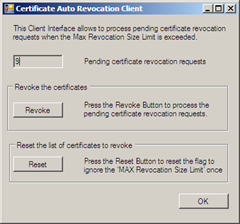
The Certificate Autorevocation Client shows the number of certificates which the Certificate Autorevocation Service wants to revoke the next time.